Cleanup정리
18.4GB
Caches and logs your apps rebuild앱이 다시 만드는 캐시와 로그
MAC CORE finds caches and leftovers you no longer need, shows where your disk space went and keeps an eye on your Mac — and you review everything before it moves.MAC CORE는 더 이상 필요 없는 캐시와 잔여물을 찾고, 디스크 공간이 어디에 쓰였는지 보여 주며, Mac 상태를 계속 살핍니다. 정리 전에는 언제나 직접 확인합니다.
Direct edition available now · App Store release in preparation직접 배포판 제공 중 · App Store 출시 준비 중
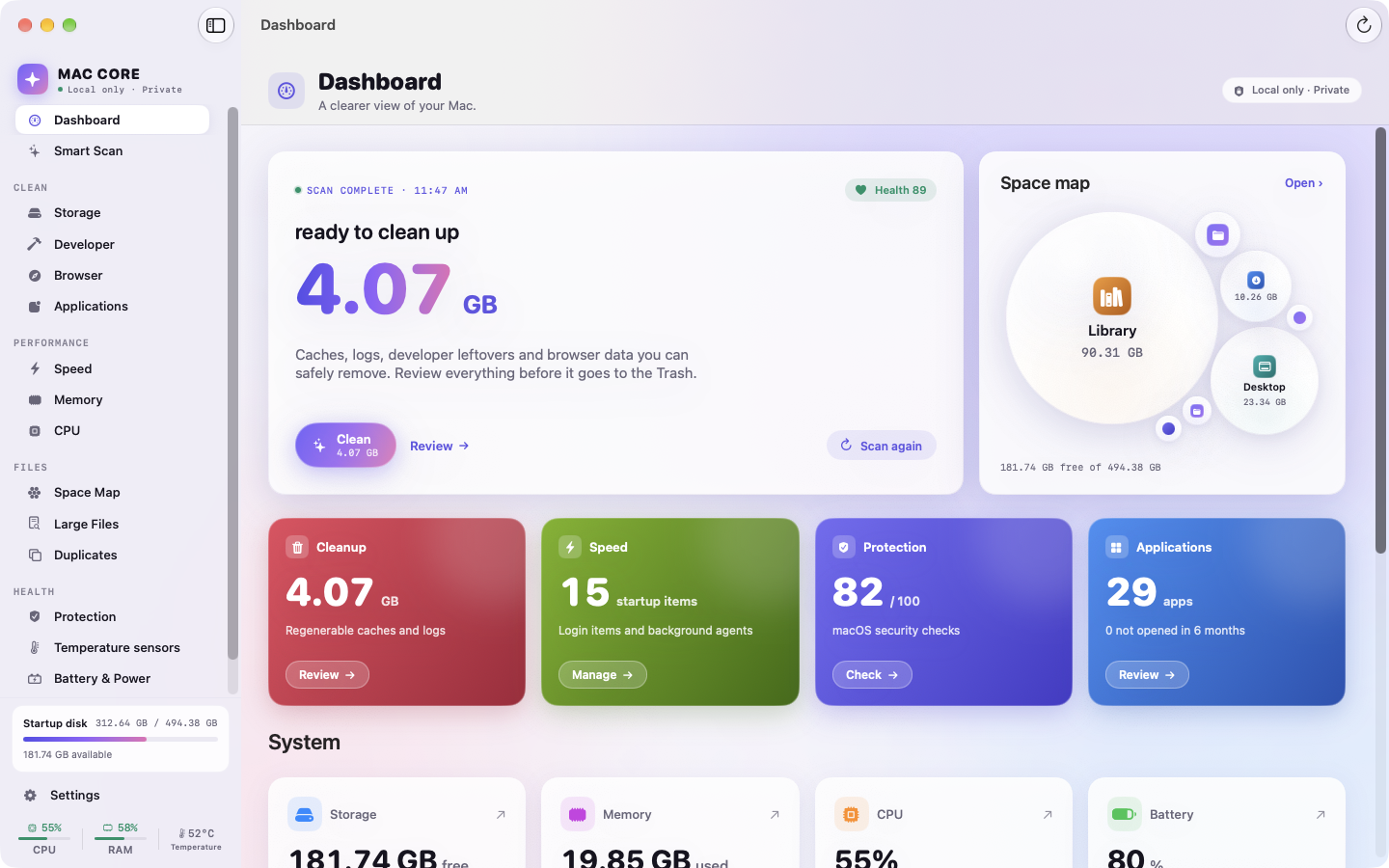
Actual app interface. Results depend on your Mac.실제 앱 화면입니다. 결과는 Mac에 따라 다릅니다.
App caches, logs, Xcode DerivedData, simulator caches, package-manager caches and browser data — sorted by how safe they are to remove. Only safe items are pre-selected, and everything goes to the Trash first.앱 캐시, 로그, Xcode DerivedData, 시뮬레이터 캐시, 패키지 관리자 캐시, 브라우저 데이터까지 안전도에 따라 분류합니다. 안전한 항목만 미리 선택되며, 모든 항목은 먼저 휴지통으로 이동합니다.
Values shown are illustrative.예시 수치입니다.
Every folder becomes a bubble — the bigger the bubble, the more space it takes. Click to go deeper, reveal it in Finder, and spot folders that hold something worth cleaning.폴더 하나하나가 버블이 됩니다. 버블이 클수록 많은 공간을 차지합니다. 클릭해 안으로 들어가고, Finder에서 열고, 정리할 거리가 있는 폴더를 찾아보세요.
Large Files and Duplicates find the rest: identical copies are confirmed by content, never by name alone.대용량 파일과 중복 파일 찾기가 나머지를 찾아냅니다. 같은 파일 여부는 이름이 아닌 내용으로 확인합니다.
Caches and logs your apps rebuild앱이 다시 만드는 캐시와 로그
Login items and background agents로그인 항목과 백그라운드 에이전트
FileVault, firewall, Gatekeeper, SIPFileVault · 방화벽 · Gatekeeper · SIP
3 not opened in 6 months6개월간 열지 않은 앱 3개
Things your apps rebuild on their own. Safe items are picked for you.앱이 스스로 다시 만드는 데이터입니다. 안전한 항목만 골라 둡니다.
See what starts with your Mac, then switch it off in one click — or back on.Mac과 함께 시작되는 항목을 확인하고, 클릭 한 번으로 끄거나 다시 켭니다.
Checks the protection macOS already has. Not an antivirus.macOS에 이미 있는 보호 기능을 점검합니다. 백신 프로그램이 아닙니다.
Every app with its size and last use. Uninstall with its leftovers.모든 앱의 크기와 마지막 사용일. 잔여 파일까지 함께 삭제합니다.
Values shown are illustrative.예시 수치입니다.
Per-core CPU, memory pressure, network rates, disk and the top processes — with five minutes of history.코어별 CPU, 메모리 압력, 네트워크 속도, 디스크와 상위 프로세스를 최근 5분 기록과 함께 봅니다.
Pick up to four readings, their order, refresh rate and style. Close the window; monitoring continues.최대 4개 지표와 순서, 갱신 주기, 표시 형식을 고르세요. 창을 닫아도 모니터링은 계속됩니다.
Xcode DerivedData and archives, simulator caches, plus Swift PM, Homebrew, Gradle and pip caches.Xcode DerivedData와 아카이브, 시뮬레이터 캐시, Swift PM·Homebrew·Gradle·pip 캐시.
Caches and history for Safari, Chrome, Edge and Firefox — skipped while the browser is open.Safari, Chrome, Edge, Firefox의 캐시와 기록. 브라우저가 열려 있으면 건너뜁니다.
Break the mysterious “System Data” into identified groups — and see which parts you can safely review.알기 어려운 ‘시스템 데이터’를 항목별로 나누고, 안전하게 검토할 수 있는 부분을 보여 줍니다.
Sensor temperatures, power draw, battery health and cycle count on supported Macs.지원되는 Mac에서 센서 온도, 전력 사용량, 배터리 성능과 충전 횟수를 확인합니다.
No account, advertising or analytics SDK in the app. Scans, readings and file lists are processed on your device and never uploaded.앱에는 계정, 광고, 분석 SDK가 없습니다. 검사 결과, 측정값, 파일 목록은 기기에서 처리되며 업로드되지 않습니다.
Free for macOS 14 and later. Apple silicon and Intel.macOS 14 이상 무료. Apple Silicon · Intel.
Two editions: the App Store version is sandboxed and cleans only folders you allow; the direct edition includes sensors, System Data, browser cleanup, the uninstaller and process tools. Compare editions두 가지 버전: App Store 버전은 샌드박스에서 허용한 폴더만 정리하고, 직접 배포판은 센서, 시스템 데이터, 브라우저 정리, 앱 삭제, 프로세스 도구를 포함합니다. 버전 비교